VSCode 配置 TeX/LaTeX 开发环境
一、检查 TEX
通过 tex -version 命令检查当前用户目录下 TexLive 是否可用:
(base) [wanghh@platform_fat01 tex_test]$ tex -version
TeX 3.141592653 (TeX Live 2025)
kpathsea version 6.4.1
Copyright 2025 D.E. Knuth.
There is NO warranty.  Redistribution of this software is
covered by the terms of both the TeX copyright and
the Lesser GNU General Public License.
For more information about these matters, see the file
named COPYING and the TeX source.
Primary author of TeX: D.E. Knuth.或者检查软件路径是否有效:
(base) [wanghh@platform_fat01 tex_test]$ which tex
/usr/local/texlive/2025/bin/x86_64-linux/tex二、VSCode 安装 Latex Workshop 插件
插件存放地址为 /home/wanghh/Public/vsx。插件安装后重启 VSCode,随后新建并打开一个 .tex 文件,latex 插件即可在左侧栏出现。插件使用比较简单,可自行尝试。
使用插件编辑 latex 前,需要先配置 VSCode 环境:打开 setting.json,添加下列配置即可:
	"latex-workshop.latex.autoBuild.run": "never",
    "latex-workshop.showContextMenu": true,
    "latex-workshop.intellisense.package.enabled": true,
    "latex-workshop.message.error.show": false,
    "latex-workshop.message.warning.show": false,
    "latex-workshop.latex.tools": [
        {
            "name": "xelatex",
            "command": "xelatex",
            "args": [
                "-synctex=1",
                "-interaction=nonstopmode",
                "-file-line-error",
                "%DOCFILE%"
            ]
        },
        {
            "name": "pdflatex",
            "command": "pdflatex",
            "args": [
                "-synctex=1",
                "-interaction=nonstopmode",
                "-file-line-error",
                "%DOCFILE%"
            ]
        },
        {
            "name": "latexmk",
            "command": "latexmk",
            "args": [
                "-synctex=1",
                "-interaction=nonstopmode",
                "-file-line-error",
                "-pdf",
                "-outdir=%OUTDIR%",
                "%DOCFILE%"
            ]
        },
        {
            "name": "bibtex",
            "command": "bibtex",
            "args": [
                "%DOCFILE%"
            ]
        }
    ],
    "latex-workshop.latex.recipes": [
        {
            "name": "XeLaTeX",
            "tools": [
                "xelatex"
            ]
        },
        {
            "name": "PDFLaTeX",
            "tools": [
                "pdflatex"
            ]
        },
        {
            "name": "BibTeX",
            "tools": [
                "bibtex"
            ]
        },
        {
            "name": "LaTeXmk",
            "tools": [
                "latexmk"
            ]
        },
        {
            "name": "xelatex -> bibtex -> xelatex*2",
            "tools": [
                "xelatex",
                "bibtex",
                "xelatex",
                "xelatex"
            ]
        },
        {
            "name": "pdflatex -> bibtex -> pdflatex*2",
            "tools": [
                "pdflatex",
                "bibtex",
                "pdflatex",
                "pdflatex"
            ]
        },
    ],
    "latex-workshop.latex.clean.fileTypes": [
        "*.aux",
        "*.bbl",
        "*.blg",
        "*.idx",
        "*.ind",
        "*.lof",
        "*.lot",
        "*.out",
        "*.toc",
        "*.acn",
        "*.acr",
        "*.alg",
        "*.glg",
        "*.glo",
        "*.gls",
        "*.ist",
        "*.fls",
        "*.log",
        "*.fdb_latexmk"
    ],
    "latex-workshop.latex.autoClean.run": "onFailed",
    "latex-workshop.latex.recipe.default": "lastUsed",
    "latex-workshop.view.pdf.internal.synctex.keybinding": "double-click",
"latex-workshop.view.pdf.viewer": "tab"以上配置可根据需要自行更改。
编译选项以 XeLaTeX 为主(其对中文支持较好)。
三、中文字体使用说明
XeLaTeX 本身对中文的支持较为友好,此外 TEX 自带了一些中文字体。通过 fc-list :lang=zh 命令可以查看当前已安装的中文字体:
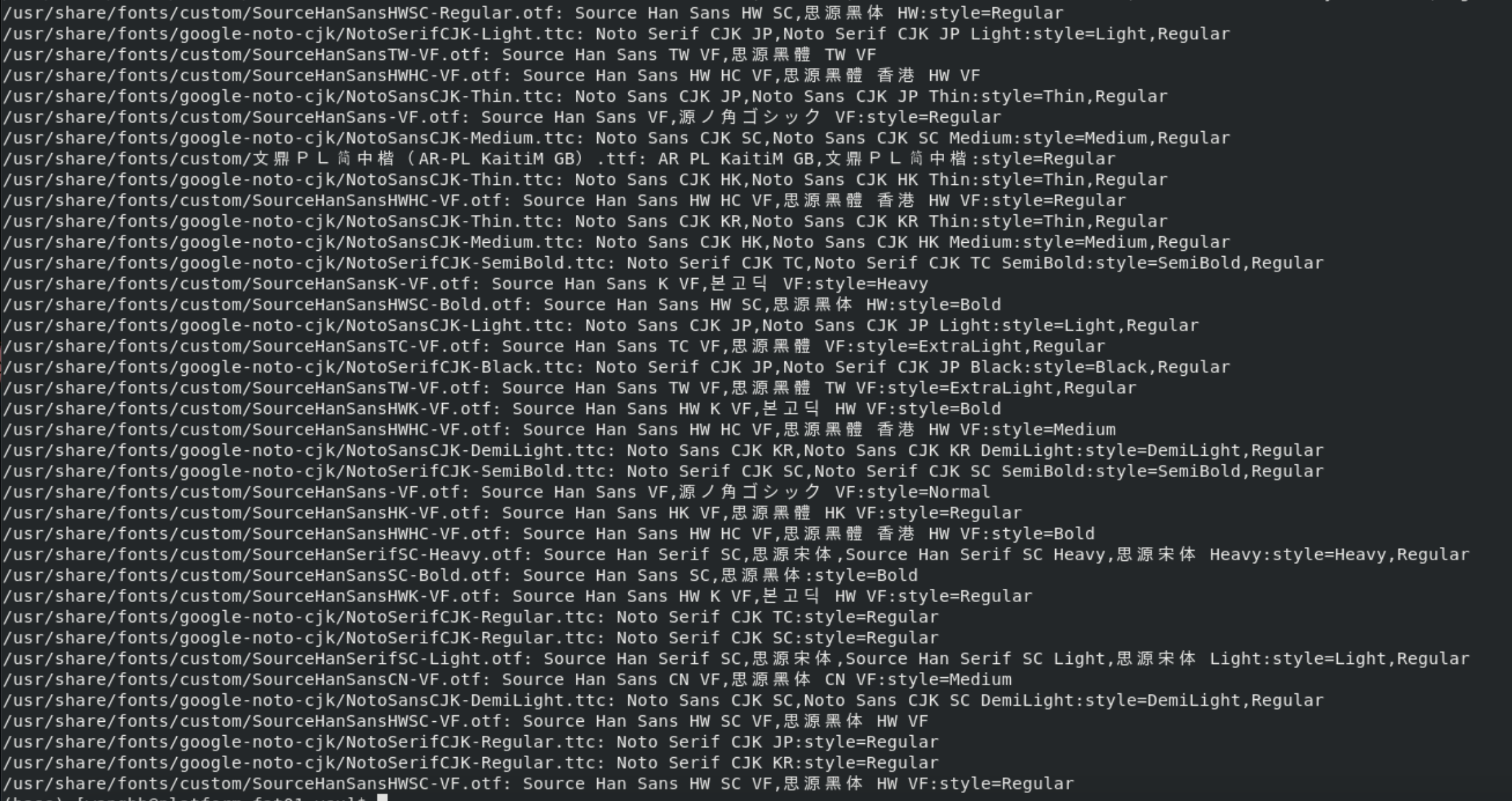
其中 /usr/local/texlive/2025/texmf-dist/fonts/ 路径下为 TEX 自带的字体,/usr/share/fonts/custom/ 路径下为我们安装的字体,主要包括以下几类:
% Noto Serif CJK SC
% Source Han Serif SC
% AR PL KaitiM GB
% Source Han Sans SC具体字体细分(黑体、粗体、细体等)可根据需求修改。